Use the Advanced Settings menu:
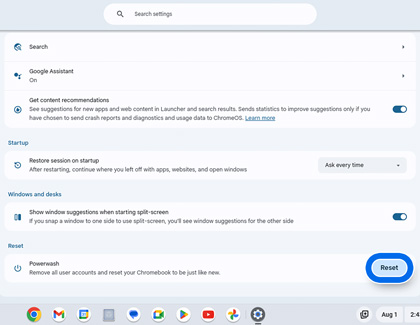
- Select the Taskbar in the lower right, and then select Settings.
- Select Advanced at the bottom.
- Scroll to the Reset settings section, then select Powerwash, and then select Reset.
- After the restart, select Powerwash when prompted, and then select Continue.
Use the shortcut keys:
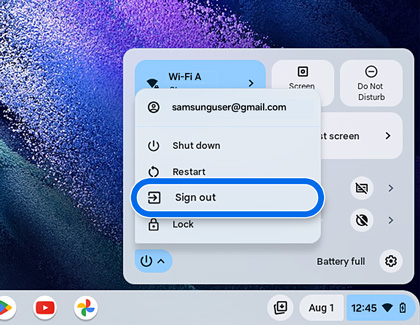
- Select the Taskbar in the lower right, then select the Power icon, and then select Sign out.
- Press and hold CTRL + ALT + SHIFT + R on the keyboard, and then select Restart.
- When prompted, select Powerwash, and then select Continue.
Sign into your Google account
Follow the on-screen prompts and sign into your Google account to set up the Chromebook. The account you sign in with after you reset your Chromebook will be the new owner account. If you are unable to sign into your Google account, please refer to the Google Account Help center. You can also use your Chromebook without adding a Google account. Select Browse as Guest to proceed.
Test your Chromebook to see if the issue has been resolved.