


Meet the Galaxy Book5 Pro 360 - our most capable Galaxy AI PC yet. Flex your productivity on the go with the power of the latest Intel® Core™ Ultra processor Series 2, delivering boosted performance for AI-accelerated experiences. Conquer tasks and create like never before while staying charged with an all-day battery.¹˜⁴.1
See the Highlights

Supercharged performance

The connected power of Galaxy

All-day battery¹˜⁴
Galaxy connected experience
2-in-1 design. Flex to work, flip to create
Galaxy Book5 Pro 360 puts a spin on daily productivity with its 2-in-1 convertible design. Weighing in at 1.69kg with a sleek Grey finish, it's your versatile companion for hustles on the move.


Supercharged performance. Unlock your AI experience
Transform the way you work and create with AI-powered experiences on Galaxy Book5 Pro 360. The NPU capable of up to 47 TOPS combines with the blazing-fast Intel® Core™ Ultra processor Series 2 to deliver robust AI performance — a total game changer for your PC productivity.2


Stay powered with all-day battery¹˜⁴
Get the power to keep going all day — with a long-lasting 76Wh (typical) battery for up to 25 hours of video runtime. Take a break as you top up your laptop with 35% charge in just about 30 minutes using a light and compact charger that even works with your other Samsung Galaxy devices.


Dynamic AMOLED 2X. Your creations displayed brilliantly
Bring your artistic vision to life on the breathtaking 16-inch display. Marvel at the crisp details in high resolution with bright and vivid colours, smooth scrolling and onscreen motion, and reduced blue light emission for eye comfort.3


Anti-reflective cover glass. Dazzling views at any angle
Experience a clear view of your favorite content with less distractions thanks to Corning® Gorilla® Glass with DX. Corning’s glass technology decreases the amount of unwanted reflections and glare, helping onscreen visuals to remain crisp and legible from different angles and particularly in brightly lit environments.


Touchscreen with S Pen. Tap to get creative
Create works of art intuitively using your fingertips or the included S Pen on the touchscreen of Galaxy Book5 Pro 360. Write, draw and navigate with responsive multi-touch gestures and fine-tune details across your projects with the accurate S Pen.4


Big woofers. Deeper sound
More than 2x larger than before, the 38mm Big woofers on Galaxy Book5 Pro 360 amplify low frequency sounds to deliver deep, rich bass for an immersive soundscape. Surround yourself in your favorite beats and stay in the groove with the upgraded quad-speaker system.5


Wi-Fi 7. Full speed ahead
Surf, stream and share content on the fly with the lightning-fast speed of Wi-Fi 7. Go from uploading creative works online to enjoying your favorite shows in an instant with ultra-low latency and better reliability.6


Precise touchpad. Plenty of ports
Navigate easily using the touchpad with adaptive palm rejection — control your taps with precision thanks to palm monitoring on the subdivided palm area, reducing the chance of accidental touches. Plus, connect what you need dongle-free with versatile built-in ports, including HDMI, USB-A, microSD slot and two Thunderbolt 4 ports for rapid data transfers.


Samsung Knox. Pro security. Anti worry
Safeguard your system with premium security from Samsung Knox. A dedicated security chip in the hardware is designed to shield your device in real time. Protected all around, your laptop's critical system data can stay safe from potential threats and breaches.7


AI experiences are coming8


Link your phone. Unleash Galaxy AI on PC
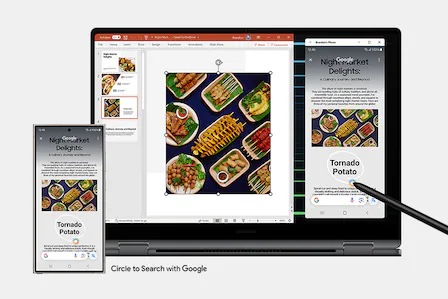
Connect your smartphone to your PC via Phone Link to access recently viewed webpages or launch up to 5 mobile apps right from your laptop. Use smart features like Circle to Search with Google, Note Assist and Chat Assist from your Galaxy smartphone and get an expanded view on the big screen of Galaxy Book5 Pro 360.9


The connected power of Galaxy
Seamlessly pair and control Galaxy devices
Nearby devices lets you connect and operate your Galaxy devices in an instant. Open the menu on Galaxy Book5 Pro 360 to link devices with a simple drag-and-drop, then launch intuitive features such as Multi Control and Storage Share between your phone, PC and Tab all from one connectivity hub.10


Storage Share. Explore files across devices
With Storage Share, enjoy the freedom of using the storage on your phone and PC as one. Browse photos and play videos stored on your phone, edit mobile content and import it in your projects directly on your PC — no file downloading required.11


Use your phone as a connected camera
Upgrade your video calls from standard laptop webcam to stunning clarity using your Samsung Galaxy smartphone as a connected camera. Connect seamlessly to your Galaxy Book5 Pro 360, switch between front and rear cameras to find your angle, and enjoy a high-quality picture with enhanced effects in Galaxy camera.12


It's all under control with Multi Control
Manage your creative projects with flexibility across devices with Multi Control. Use your Galaxy Book5 Pro 360's keyboard with a mouse to navigate through content on your smartphone, Galaxy Tab, Samsung TVs or Smart monitors. Drag and drop or copy and paste text, images and files between devices to put your ideas together.13


Two screens are better than one
Get an instant dual-monitor experience with your Galaxy Book5 Pro 360 and Galaxy Tab side by side. Launch the Second Screen app from your laptop with just a click, then use Extension or Duplicate mode to rearrange your tablet's screen, or go vertical with Rotation mode.14


Quick Share. File transfer at your fingertips
Share your inspiring concepts and finished masterworks to other Samsung Galaxy devices in a flash via Quick Share. If you need to send something more personal, the private sharing feature protects your sensitive data by encrypting it with blockchain technology.15
Specifications
-
Windows 11 Home (Samsung recommends Windows 11 Pro for business)
-
Intel® Core™ Ultra 7 Processor 256V
-
Intel® Arc™ 140V GPU (8GB)
-
Intel® AI Boost
-
16.0" WQXGA+ AMOLED Display (2880 x 1800), Anti-Reflective, Touch Screen Panel, S Pen Support
-
16 GB LPDDR5X Memory (On Package)
-
1 TB NVMe SSD
Number of SSD Slots : 1
-
None
-
Gray
-
Quad Speakers ( Woofer Max 5 W x 2, Tweeter 3.3 W x 2)
Smart Amp
Dolby Atmos®
Internal Dual Array Digital Mic
2M Camera
-
Bluetooth v5.4
Wi-Fi 7, 802.11 be 2x2
-
1 HDMI 2.1 (Supports 8K@60Hz, 5K@120Hz)
2 Thunderbolt™ 4
1 USB3.2
MicroSD Multi-media Card Reader
1 Headphone out/Mic-in Combo
-
Pro keyboard with Numeric key
(Backlit keyboard)
Touch screen
Clickpad
S Pen
-
TPM, FingerPrint Reader
-
76 Wh (Typical)
65 W USB Type-C Adapter
-
355.4 x 252.2 x 12.8 mm (13.99" x 9.93" x 0.50")
-
1.69 kg (3.73 lbs)
-
Galaxy Book Experience
Multi Control
Second Screen
Samsung Notes
Samsung Gallery
Quick Share
Samsung Account
Samsung Settings
SmartThings
Quick Search
Samsung Device Care
Screen Recorder
Live Wallpaper
Bixby
Samsung Find
Samsung Flow
Samsung Studio
Phone
Galaxy Book Smart Switch
Samsung Pass
Air Command
PENUP
※ Software can be changed without notice.
-
Ambient Light Sensor
Accelerometer Sensor
Gyro Sensor
-
* Actual speed of USB can vary depending on user environment
* Weights and height vary depending on manufacturing process
* Please contact Samsung Call Center or Samsung Authorized Service Centers before you replace or add storage and memory for compatibility check
* Typical value of battery capacity tested under third-party laboratory condition. Typical value is the estimated average value considering the deviation in battery capacity among the battery samples tested under IEC 61960 standard. Rated (minimum) capacity is 73.9 Wh. Actual battery life may vary depending on network environment, usage patterns and other factors.
* Screen size is measured diagonally as a full rectangle without accounting for the rounded corners. Actual viewable area is less due to the rounded corners.
User manual & Downloads
Solutions & Tips
- How to upgrade your Samsung computer to Windows 11
- How to restore your computer to its initial state using Samsung Recovery if it is not booting in Windows
- What is the difference between a Samsung Chromebook and a Samsung notebook?
- What does DVI mean?
- How long is the UK manufacturer warranty period on my Samsung notebook PC?
Actual speed of USB can vary depending on user environment
Weights and height vary depending on manufacturing process
Please contact Samsung Call Center or Samsung Authorized Service Centers before you replace or add storage and memory for compatibility check
Typical value of battery capacity tested under third-party laboratory condition. Typical value is the estimated average value considering the deviation in battery capacity among the battery samples tested under IEC 61960 standard. Actual battery life may vary depending on network environment, usage patterns and other factors.
Screen size is measured diagonally as a full rectangle without accounting for the rounded corners. Actual viewable area is less due to the rounded corners.